For some reason I put together another AR. I’ve had a pretty nice Colt’s Match HBAR for years, but I thought a light carbine would be good to have around for kids, new shooters and such. My daughter might want it at some stage.
This new one is cobbled together from nearly as disparate a set of parts as is possible. I think every parts group is made by a different company. The aluminum, railed gas block, for example, was knocked out on an old Bridgeport mill by Some Dude in Moscow, Idaho– I had to mount it on the lathe and trim it down a bit to make it clear the floating handguard, which is a used piece off of Some Other Dude’s AR. It’s all assembled as a mock-up right now. Mostly new parts, some of the metal being in the white. I wanted to proof test it before taking it all apart again, bead blasting it and giving it a finish of some kind.
Since none of the working parts had ever fired a cartrige before, I cranked off four rounds with the carbine held at arm’s length, one-handed, into a hillside (the thought had come to mind that the thing could blow up, and if it was going to do that I wanted it to happen far away from my face). Perfect function. All ejected cases ended up in a nice tight group off to my right, too.
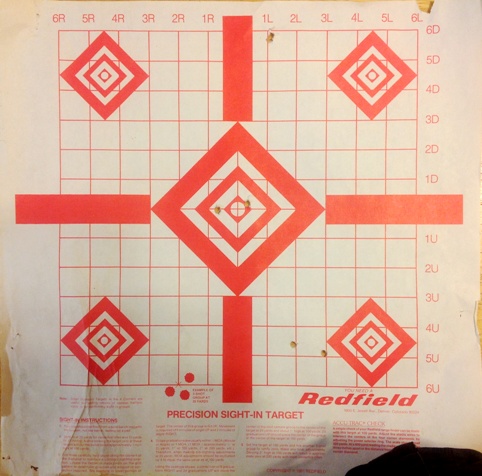
After putting a few shots on paper at 25 yards, I took it out to 100 to get a good zero on the TX30 reflex sight. Here’s the 100 yard target. I fire two-shot groups for initial sight-in. One-shot “groups” would probably be OK for starters, but I like to get some sense of how I and the rifle are working together. The first 100 yard group is the one holer at the top of the paper, on the “1L” line. I’d thought that the TX30 had 1/3 MOA clicks like an ACOG telescope, so I over-compensated, putting the second group near the bottom of the paper. The TX30 has 1/2 MOA clicks, and the fact that the target was stapled to a log and was slanting back quite a bit accounts for the larger apparent error. Splitting the difference with a few “up” clicks, and a couple clicks left, the third group was pretty well dead on;
I have a padded steel rifle rest and some shooting bags, but I’m using them less and less. If you can’t use your vehicle, a stump, a tree branch, a rock, the ground or your knee, what kind of shooting are you practicing? In this case I was mono-podding, holding the 30 round magazine in my hand and resting the hand on the hood of the pickup. It works well enough. The truck bumper is OK too, or the tail gate, or a front tire steered over to one side. The tip of a longish snowshoe can make a decent place to rest your knee in a kneeling position… There are lots of options, so you can haul around less stuff.
Three consecutive two-shot groups of around 1 MOA and less. I be happy for now. Don’t ask me to repeat it. It was getting dark so I called it a day and let the dog out to romp around for a bit and get wet and smelly before the ride home. Ultimately I think I’ll want a solid 200 yard zero for this reflex-sighted carbine.
Dealing with “issues” while shooting is a good thing. In this case it was failing light, mosquitoes, my dog which hates gunfire (he ended up inside the pickup, and his moving around made the pickup, which I was using as a shooting rest, move just a little bit while aiming) and the fact that I’d ended up out there with no spotting optic so I had to trot the 100 yards back and forth to determine shot placement. That and there were people driving up and down the road, which was close enough I didn’t want to fire while people were so close and make them nervous. So I’m looking around, listening, swatting bugs, dealing with the dog, hurrying, and huffing and puffing a little. It’s an exercise in being very still while immersed in little stresses and distractions. That’s part of why I like rifle shooting so much. It’s wonderful. Sometimes it works out great and other times you chalk it up to learning. This time was like a dream, but I’ll have to figure out what happened to my 20×60 binocs.
This new light carbine is pounds lighter than my scoped HBAR rifle. I think it’s going to be one of my favorite shooters. I’d never “built” an AR before, and even though I’d had my Colt, and a Rock River, apart many times it was surprising to me how easy it was to cobble one together from parts. A fairly small child could do it, with a little bit of instruction.